
Custom websites, web applications and business software — built around your workflow. Available for selected projects
Web Application · Education Operations

School Management System

A portfolio capability for connecting school management, principals, teachers and students through role-based academic and administrative workflows.

Portfolio capabilityPHPMySQLHTML5CSS3
Project overview

A system shaped by the work it needs to support

The proposed system centralises authorised records and gives each role a focused dashboard. Management can oversee operations, principals can review academic activity, teachers can maintain assigned information and students can access relevant notices or results.

This case study presents the capability and system thinking behind the project. It does not identify a private client or claim revenue, adoption, performance percentages or testimonials. Final modules and technology for any new implementation would be confirmed through discovery.

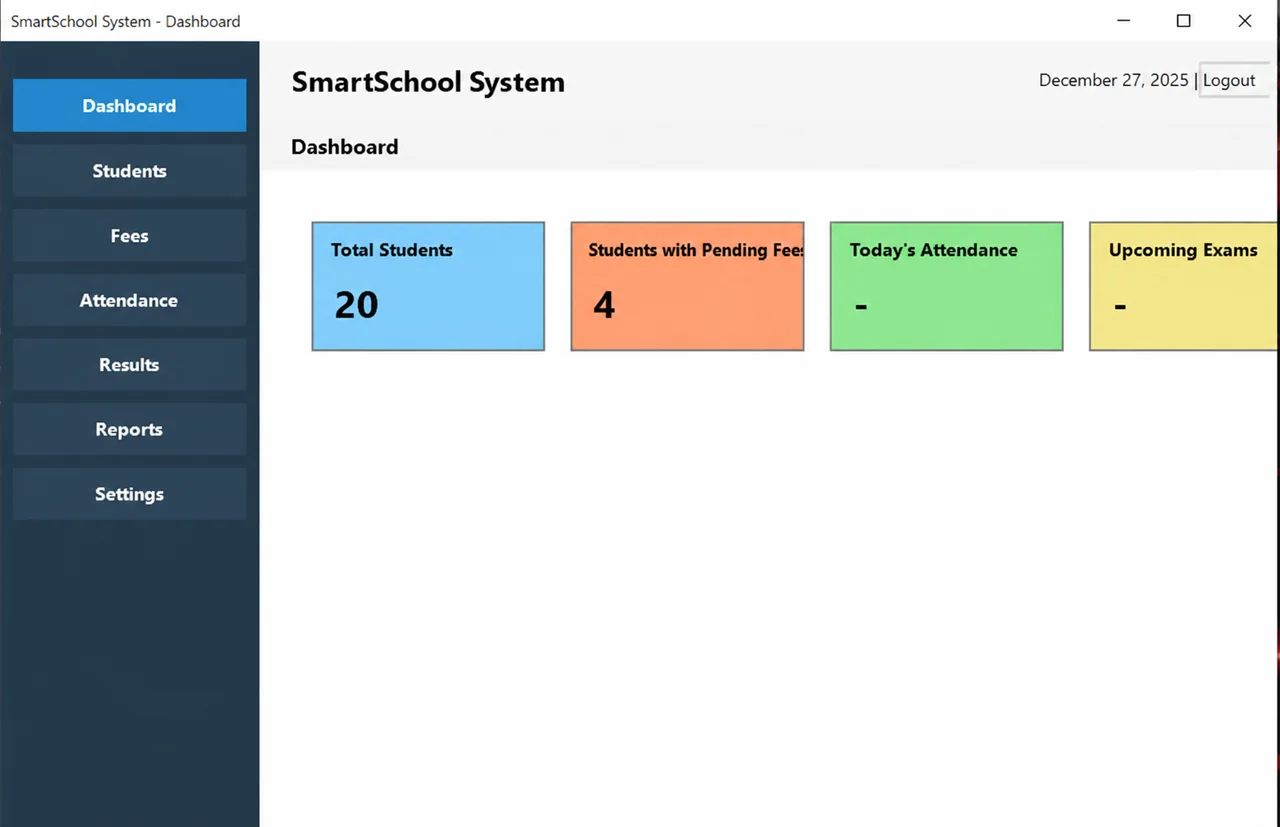
SmartSchool System dashboard with student totals, pending fees, attendance and upcoming exams
Dashboard overview
Business problem

Why a custom solution is relevant

School information can become fragmented across registers, spreadsheets and conversations. Admissions, attendance, fees, results and notices then require repeated effort and provide an incomplete operational view.

When those gaps persist, staff often create additional documents, messages or personal routines to keep work moving. That makes the process harder to review and increases dependence on individual memory. A custom system creates value only if it removes that fragmentation without introducing a more confusing interface.
User roles

Show each person the work they are authorised to perform

Roles shape navigation and default views, while server-side permission rules protect the underlying actions and data. Interface visibility alone is never treated as security.

Management

Configures core records, reviews reports and supervises administrative activity.

Principal

Reviews academic operations, notices and school-wide information.

Teacher

Works with assigned classes, attendance and results according to permission.

Student

Views personal academic information and relevant notices through a restricted area.

Workflow

How information moves through the system

An authorised user creates the academic structure before student and teacher records are assigned. Daily actions such as attendance feed the same database used by dashboards and reports. Results and fee information follow permission rules, preventing each user from seeing administration that does not belong to their role.

Validation should happen close to the action so a user can correct a problem with context. Important status changes and approvals need clear ownership. Reports should be produced from the same approved records used by the operational workflow rather than separately maintained totals.

Technology stack

Tools appropriate to the delivery format

PHPMySQLHTML5CSS3JavaScript

The exact architecture depends on hosting, concurrent use, offline requirements, integrations and long-term maintenance. The stack shown here represents a suitable capability direction, not a fixed package.

Responsive interface concept

Dashboard clarity without a stock image

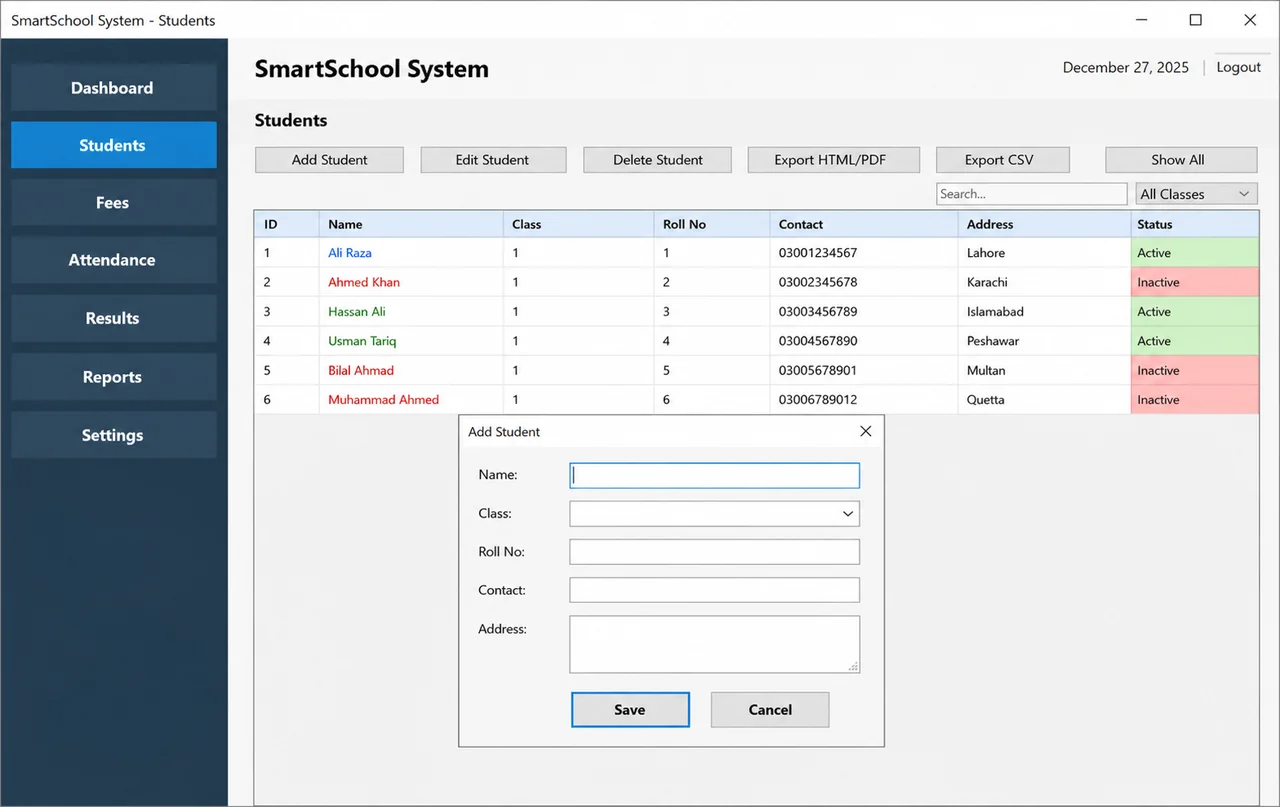
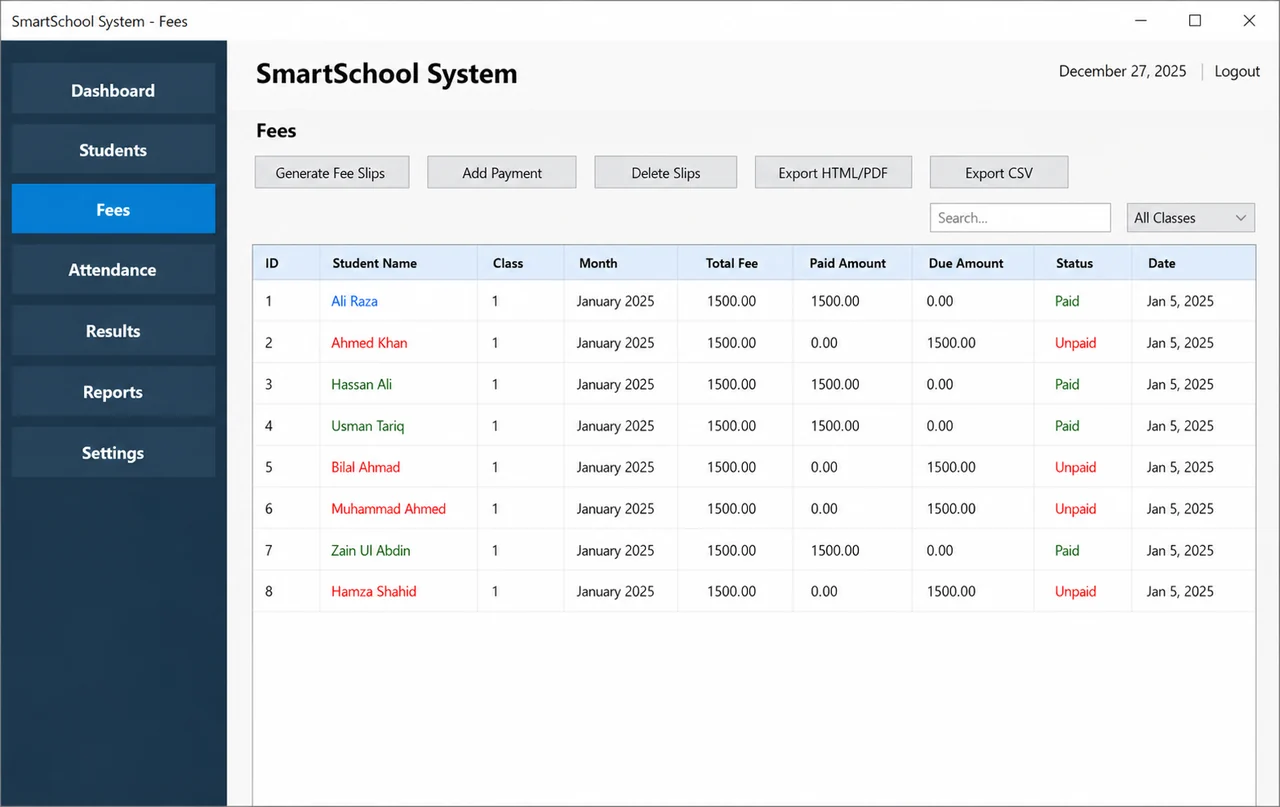
The local code-native visual reserves its dimensions and scales with the layout. A production case study can replace it with genuine screenshots after private information is removed and publication permission is confirmed. The cleaned screenshots below are that replacement: promotional overlays, phone-number text and cursor highlights have been removed so the genuine software interface can be reviewed clearly.

SmartSchool System student records screen with the Add Student form
Student records and add-student workflow
SmartSchool System fees screen with student payment status records
Fees and payment-status workflow
Project challenges

Risks to resolve during planning

  • Keep a large set of modules understandable without overcrowding the interface.
  • Define permissions early so roles do not become cosmetic labels.
  • Preserve the history and relationships between academic records.
  • Make common classroom actions usable on smaller screens.
Development decisions

How the solution stays understandable

  • Use a modular dashboard so future functions can be added without redesigning every screen.
  • Separate role permission checks from interface visibility; a hidden button alone is not access control.
  • Design reports from verified source records rather than maintaining separate duplicate totals.
  • Label this honestly as a portfolio capability without naming a client or inventing outcomes.
Relevant service

Custom PHP web application development

A similar project would begin by checking the current workflow, data sources, roles and essential first outcome. The case study provides context, while the new scope must reflect the actual business.

Explore custom php web application development

A useful first message includes

  • The current process and its main friction
  • The people who will use the solution
  • Required records, reports or exports
  • Existing software, files and integrations
  • The smallest complete workflow that would be useful
Start with the problem

Planning a project like School Management System?

Share the current workflow and required users. Coder Bhai can recommend a practical first scope and a suitable delivery structure.